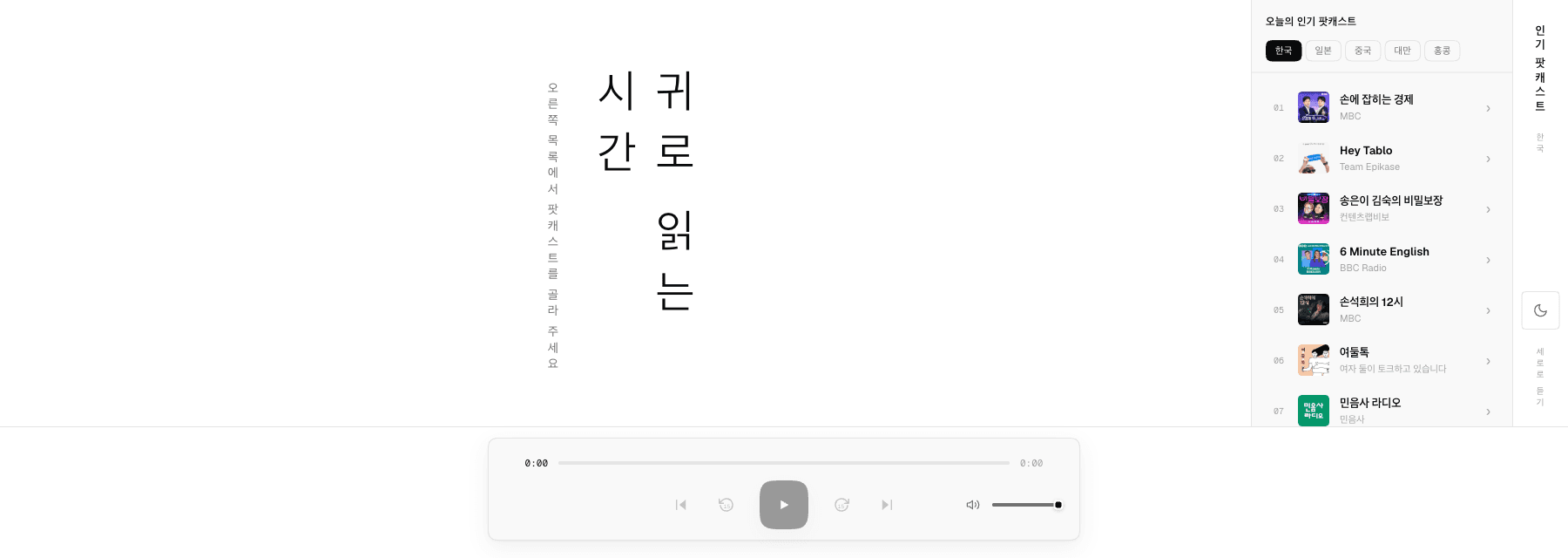
Listen here — this is the live app
Pick a show from today's charts, play an episode, and watch the transcript fall as vertical verse — 귀로 읽는 시간.
Features
Hierarchy you can trace
Shows › episodes › playing, as a breadcrumb trace with the show's artwork up top. Every crumb is live, and browsing never interrupts playback.
A shelf of columns
Today's top CJK shows (한국·일본·중국·대만·홍콩) stack as full-height rounded columns with status pills, flowing right→left like books on a shelf.
Transcripts as vertical verse
Podcasting 2.0 time-synced transcripts fall as vertical columns. The active line carries the accent, auto-scrolls with playback, and seeks on tap.
Honest text
When a feed has no transcript, show notes appear as a labeled intro panel instead — untimed text never pretends to be synced.
Full episodes, open RSS
Episodes stream in full over each show's open RSS feed — the real audio, not previews, with a conventional player bar (±15초, previous/next, volume).
Design Decisions
Why do transcripts read as verse?
A transcript is prose you follow in time. Setting each timed line as its own column makes progress legible on the page itself — the columns you have heard sit to the right, the ones still coming wait on the left, and the accent marks now.
Why does transport stay horizontal?
Time controls are instruments, not text. The player bar keeps its conventional horizontal layout so muscle memory works, and the contrast marks the boundary: reading is vertical, control is horizontal.
Why does browsing never stop playback?
The breadcrumb trace keeps shows, episodes, and the playing state simultaneously alive. In a reading interface you can look back at the shelf without losing your place in the text — audio deserves the same.
Use it in the browser
The app owns the full viewport at /apps/listen. Charts refresh daily; episodes stream from each show's open feed.